

Member Resources
Welcome.
You’re in good hands.
Everything you need to get started and stay connected — your enrollment steps, portal access, and member resources, all in one place.
Member Resources
Everything in one place
Jump to what you need




What to expect after completing enrollment
Step 1
Your enrollment documents are already signed.
During Hint signup you completed your Membership Agreement, Notice of Privacy Practices, Telemedicine Informed Consent, General Consent to Treat, and Unencrypted Communication Consent. They’re stored in your Hint chart — no separate eSignature email to chase.
Step 2
Watch for one document to sign in Google Drive.
You’ll get a Google Drive e-signature request for the Authorization for Medical Records — this lets me pull records from any prior providers you’d like on file. Sign it right in Drive.
Step 3
Your Good Faith Estimate arrives in your Akute portal.
A personalized estimate of your monthly fees comes through as a secure Akute message. No signature needed — it’s yours to keep for your records.
See Tech & Communication for information about Akute
Step 4
Accept your portal invitations.
You’ll be invited to Akute (your medical record) and Hint (your billing & membership home). iOS and Android apps are available for both — I recommend installing them right away.
Step 5
Install Spruce.
Spruce is how we text and talk securely, HIPAA-compliant. Your setup link arrives by invite after enrollment — this is the fastest way to reach me day-to-day.
Step 6
Schedule your intake visit.
Message me through Spruce or your Akute portal and we’ll get your first visit on the calendar.
Step 7
Complete your New Patient History.
Fill out the New Patient History form before your intake so we make the most of our time together.
How to Reach Dr Brian
Your B2 Direct Care Communication Guide
At a glance - which app for what
Quick, today, or urgent (not an emergency) Spruce
Think it through · clinical · for your chart Akute Portal
Billing, membership, or payment Hint
A real emergency Call 911 / nearest ER
SPRUCE
YOUR EVERYDAY LINE - FASTEST
For quick questions, something that came up today, refill requests, or scheduling. Think of it as a tap on the shoulder — secure text and voice that comes straight to me. This is the fastest way to reach me.
Good for: “Started a cough yesterday — worth a visit?” · “Can I get my refill?” · “Running 15 minutes late.”Link to app downloads: Spruce iOS · Android
AKUTE PATIENT PORTAL
YOUR MEDICAL RECORD - DEEPER
For longer messages, anything you want documented in your chart, and reviewing your visit notes and lab results. Slower than Spruce by design — it’s for the things worth thinking through, not the things that can’t wait.
Good for: “Here’s the full history with this issue…” · reviewing labs · “What did the specialist’s note mean?”Open the Akute Portal: Then access on your computer, or your device. To save on your device, use your browser's “Add to Home Screen'“ option.
Helpful AKUTE Resources
HINT
BILLING & MEMBERSHIP ONLY
Your membership home: invoices, your payment method, and plan changes. Nothing clinical lives here.
Good for: “Update my card.” · “Where’s my receipt?”LAST RESORT
The slowest way to reach me. Please route anything time-sensitive back to Spruce or Akute. While my email is HIPAA compliant, I prefer all clinical details in Spruce or Akute
In an emergency — chest pain, trouble breathing, stroke symptoms — call 911 or go to the nearest emergency
department. The apps are not monitored for emergencies.
Finding the Office
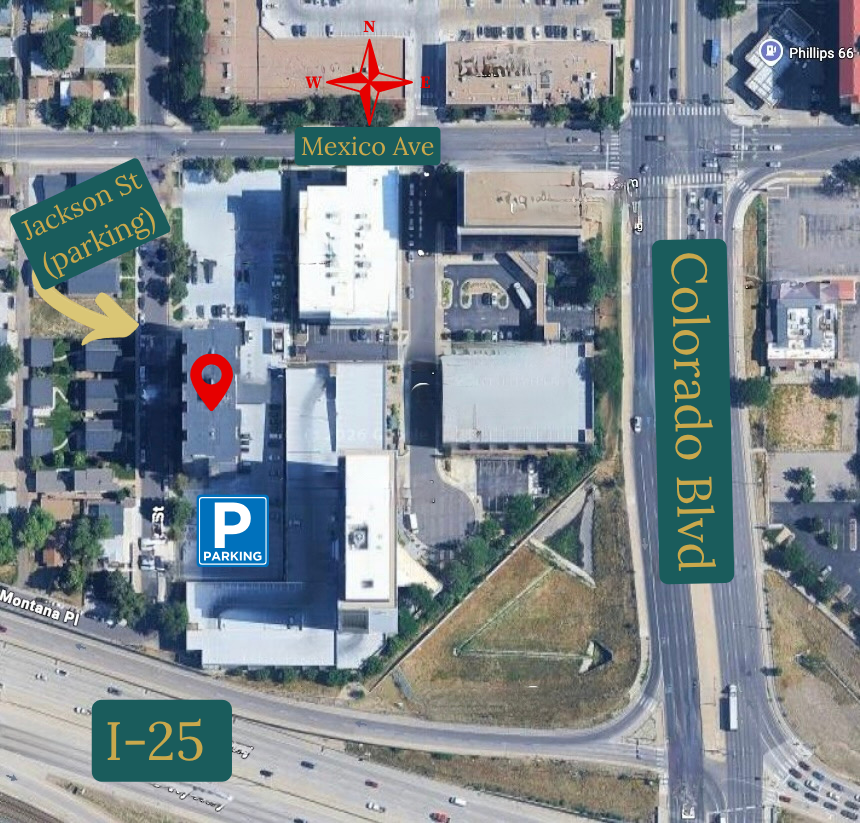
1776 S Jackson St, Suite 412, Denver, CO 80210
Parking: On S Jackson St, or in the 2-hour visitor lot just south of the building.
There are doors on the east and west side of the building — either one gets you in. Take the elevator to the 4th floor, turn left, and come to Suite 412. There's no receptionist — just have a seat on the couch and I'll come meet you there.
First time? Message me on Spruce if you get turned around — I'll walk you in.
Labs, at honest prices
One of the quiet advantages of direct care: I can offer lab work at the price I pay for it — no insurance markup, no surprise bills. (Quest or LabCorp may add a $5 draw fee per visit (~$5) at their Patient Service Centers). We hope to have in-office lab draws by the end of the year.
Why there’s no markup
Traditional clinics mark labs up, sometimes many times over, then bill your insurance and hope it sticks. I don’t. You pay what the lab charges me — often a fraction of what the same test costs through insurance. It’s the same logic behind your membership: transparent, direct, no middleman.
What to expect at Quest or LabCorp
Most labs are drawn at a Quest Diagnostics or LabCorp location near you. Once we agree on what to order, I send the order in, you book a quick draw appointment (or walk in), and results come back to your Akute portal. No clipboard of insurance forms — it’s already handled.
How lab billing works
Four simple steps:
• Estimate — I tell you what the labs will cost before anything is ordered.
• Confirm — You give the go-ahead.
• Order — I place the order with the lab.
• Invoice — You get a clear invoice for exactly the estimated amount.
Paying for labs
Member pricing is the default and usually your best deal — you pay exactly what Quest or LabCorp charges me, billed to your card on file through Hint.
Prefer to use your insurance? We can send the order so Quest or LabCorp bills your plan directly instead — just know this usually costs more than member pricing, and I do not have access to those lab prices or if you may have additional costs.
Billing & membership
Your membership and all billing live in Hint — one tidy home for your invoices, payment method, and plan.
Your monthly membership
Your membership is billed monthly to the card or bank account on file in Hint. Your receipts are always available in the Hint portal.
Update your card on file
Log in to Hint, open Payment Methods, and add or update your card or bank account. Changes take effect on your next billing date.
Lab & other charges
Lab work and any à la carte services are billed separately from your membership, always with an estimate first. See the Labs page for how that works.
Questions about a charge
Message me through Hint for anything billing-related — it keeps your membership and payment history in one place.